01 / BUILD THE ESTIMATE
Build a number your team can inspect.
Good estimating software should show how the total was built—not just produce a final price.
01
Measure the scope
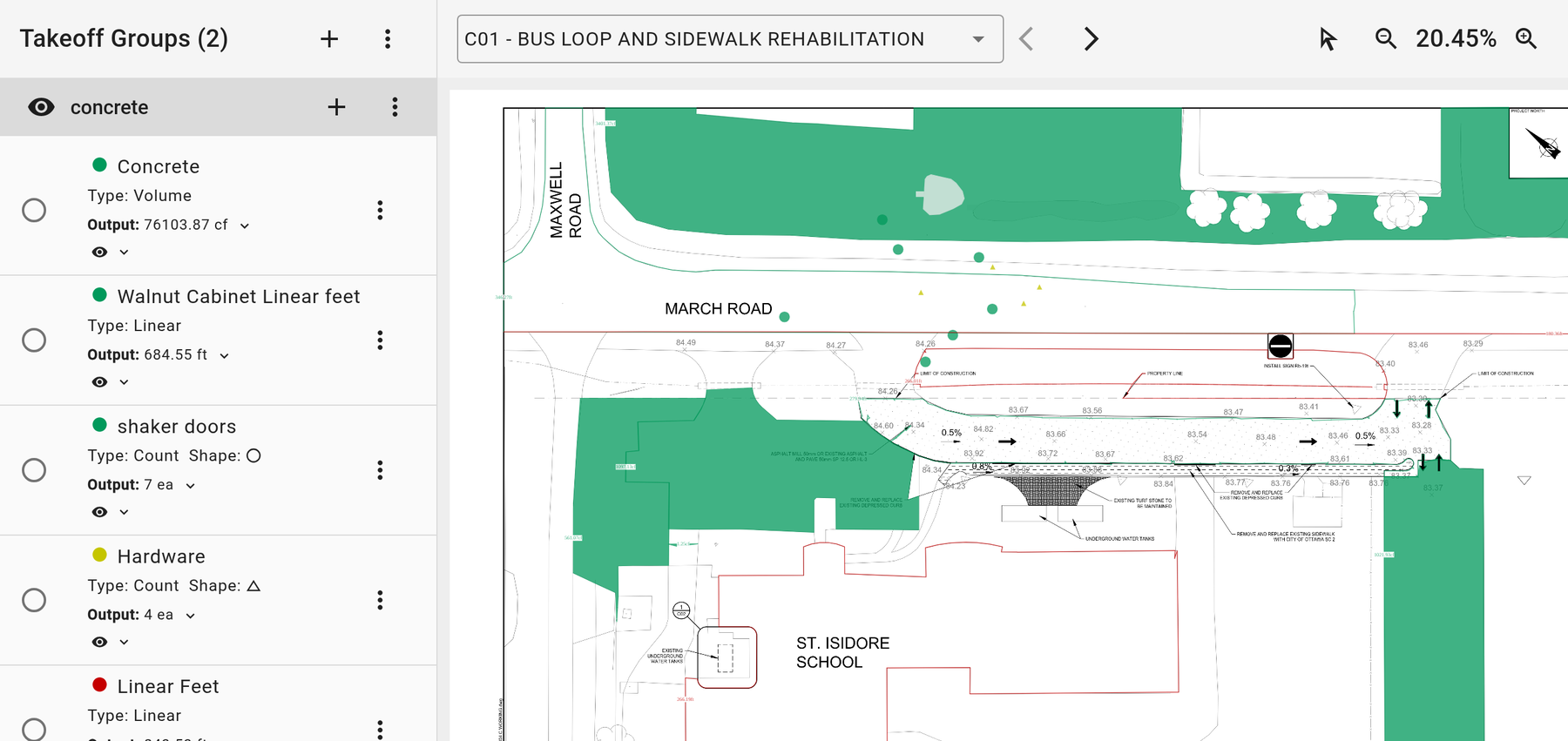
Use area, length and count takeoffs on drawings to establish quantities before you price the work.
02
Price with your own costs
Apply your labor, material and equipment rates. Keep markup and contingency visible by cost code.
03
Review the bid, not just the total
Compare trade bids and inspect the quantities, rates and assumptions behind the estimate.
02 / START THE JOB
Keep the estimate. Start the project budget.
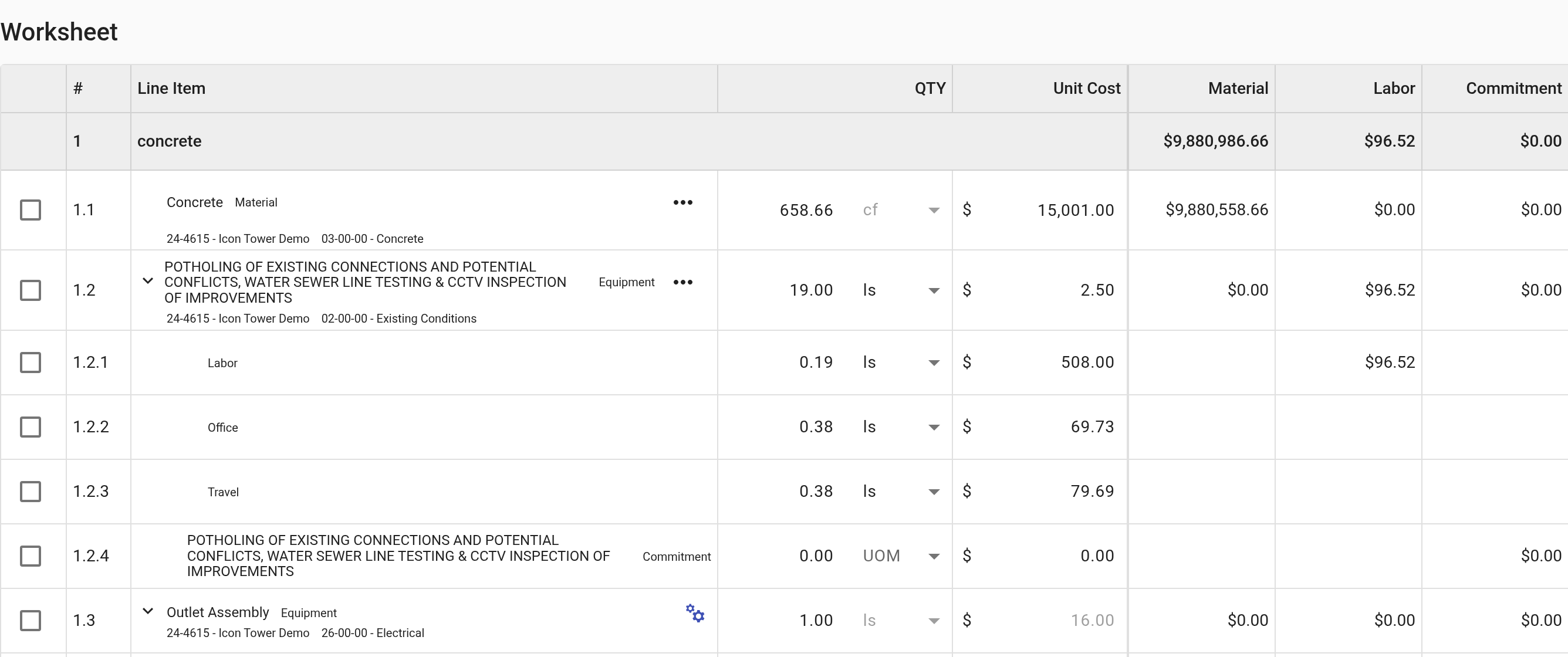
Buildend converts the approved estimate into the project budget using the same cost structure. The team starts from the approved number, rather than re-entering it.
01
Measured scope
Takeoff quantities
02
Priced estimate
Unit costs + markup
03
Approved number
Review before handoff
04
Project budget
Same cost structure
CHECK IT IN A DEMO
Bring one estimate. Follow a cost code, quantity and approved total into the budget. Ask how later scope changes are controlled.
03 / ACCOUNTING FIT
Connected is only useful if the right records move.
Check the integration for your accounting product—not just whether its logo appears on a page.
DOCUMENTED EXAMPLE
Buildend + Sage 300 CRE
Connect project financial workflows with your accounting system. Verify record types, direction and setup before you commit.
Explore Sage 300 integration ↗Set up the connection
Vendor records and cost-code alignment
Buildend → Sage 300 CRE
Subcontracts / purchase-order commitments and approved changes
Sage 300 CRE → Buildend
Commitment invoices and direct costs for project financial visibility
Using a different accounting system?
Confirm supported records, sync direction, approval triggers and error handling for your specific product and version.
Check your accounting integration →04 / ROLLOUT & COST
Plan the change, not just the subscription.
Software selection is also a decision about data, ownership and the first live project. Make those decisions before rollout.
01
Name your owner
Assign an internal administrator to own company setup, cost codes, permissions and workflow decisions.
02
Choose what moves first
Inventory the data you need. Decide what to migrate, what to retain for reference and what to archive.
03
Pilot a complete handoff
Test an estimate-to-budget workflow with your estimator, project manager and accounting owner before wider rollout.
Custom platform pricing.
Unlimited users, storage and modules.
One platform fee, without per-seat tiers. Implementation costs depend on data migration, ERP integrations, cost-code imports and training. Confirm scope and fees in writing.
Discuss scope & pricing →BEFORE YOU COMPARE
A few useful distinctions.
The practical questions that are worth settling before a software shortlist becomes a purchase.
What is the difference between takeoff and estimating?
Takeoff measures quantities from drawings. Estimating applies unit costs, labor, materials, equipment, markup and contingency to price that scope.
Can we bring an Excel estimate into Buildend?
Buildend supports CSV import and export for estimate data. That is not the same as preserving Excel formulas, macros or workbook formatting. Confirm the fields and mapping for your file.
Will software make an estimate accurate?
Accuracy still depends on drawing scope, quantities, unit costs and review. Software helps structure the work; it does not replace professional judgment.
Does every field user need to edit estimates?
No. Configure permissions by role so people can access the project information they need without giving everyone estimate-editing rights.
MAKE THE NEXT STEP SPECIFIC
Bring an estimate. See where the work goes next.
Walk through the quantities, pricing, budget handoff and accounting connection with the people who will own the process.
Include your estimator, project lead and accounting owner.