Construction budgeting software
Your budget should follow the job.
Construction budgeting software for general contractors connects budgets, commitments and approved changes in Buildend. See where project costs stand without rebuilding the picture at month end.
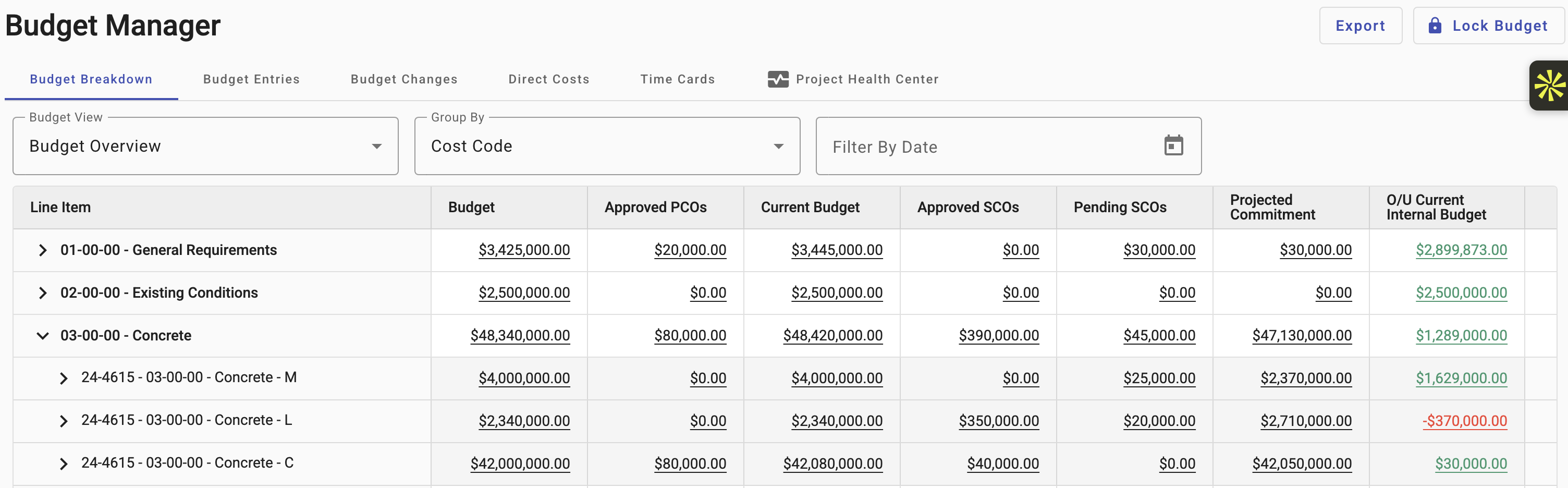
Budget Manager screen supplied by Buildend.
Construction budgeting: see beyond spend.
For contractors and builders, construction budgeting software brings budgets, commitments, actual costs and projected final cost into one view. Cost management software should make remaining work visible too, so low spend is not mistaken for a healthy job.
Cost tracking · Budget Manager example
Concrete looks $1.29M under. One line is $370,000 over.
Concrete – L has a $2,340,000 current budget with no approved owner changes. Meanwhile $350,000 in subcontract change orders are approved and $20,000 more are pending, which takes the projected commitment to $2,710,000. Use cost reporting to investigate profit erosion and the causes of unprofitable jobs.
Original subcontract
Awarded at the $2,340,000 current budget
$2,340,000
+ Approved SCOs
Subcontract change orders already approved
$350,000
+ Pending SCOs
Subcontract change orders awaiting approval
$20,000
= Projected commitment
$370,000 above the $2,340,000 current budget
$2,710,000
Sample line from the Budget Manager example above. A rolled-up cost code can hide an over-budget line.
Cost tracking, from estimate to invoice.
For general contractors, cost tracking depends on timely commitments and changes from trade contractors. Buildend connects those records to the budget lines they explain.
01
Start with the estimate
Carry the approved estimate into the project budget with the same cost codes.
02
Record the commitment
Record contracts and purchase orders for trade contractors against the right cost codes, so committed cost updates as work is awarded.
03
Approve the change
Approved change orders update the budget. Keep the reason for each movement connected.
04
Follow the invoice
See related records together, for example, an invoice linked to its purchase order.
Reporting with a review trail
Cost reporting should explain a change, not just show a new total. Investigate the commitments and changes behind a cost code before making management decisions.
Control without extra re-entry
Financial management with cost control.
Financial management needs flexibility and control. Configure financial workflows, approvals and permissions around how your construction team reviews costs and shares information.
Control who approves costs
Define the steps and responsibilities for financial approvals, including purchase orders.
Access that fits the role
Have your administrator configure who can access project information and what each role can do.
Reporting you can trace
Keep a traceable history of who changed records and when, while preserving historical context.
Construction management software, connected.
Buildend is construction management software, not a replacement for your accounting system. Keep project financials and operational workflows in Buildend while accounting remains in its system of record.
Available connections include QuickBooks Online and Desktop, Sage 100, Sage 300 and Yardi.
Buildend
Budgets · commitments · changes Project workflows and approvals
Relevant information moves between systems
Confirm records, direction and timing
Your accounting system
Accounting records and financial processing Your financial system of record
Does your version connect?
Check the exact accounting product and version, not just the vendor name.
What moves, and when?
Agree the records, sync direction and update frequency for your workflow.
Who handles exceptions?
Define ownership for mapping, failed updates and mismatched totals.
Project financials need a workable transition.
For contractors managing different kinds of jobs, from small works to large projects, the top priority is protecting active work. Plan construction budgeting around project stages, accounting and team capacity, with a named internal administrator.
01
Map what must carry over
Map cost codes, open commitments, current budgets and historical records. Account for migration complexities by agreeing what becomes live data, an archive, or stays in the old system.
02
Prove one workflow
Use a suitable project to check approvals, accounting handoffs and reporting. Reconcile the numbers before the team relies on them.
03
Roll out with clear ownership
Agree training, support and responsibilities for office and field users. Confirm which active projects move and which finish in the existing system.
Construction budgeting software FAQs.
Can we still export reports to Excel or PDF?
Yes. Export budget reports to Excel or PDF for customers, lenders and internal management reviews. Confirm the cost fields and reporting layout they need.
What does the budgeting software cost?
Pricing is a customized platform fee with unlimited users and all modules included. Migration, integrations, cost-code imports and training can affect implementation cost; confirm these in your proposal.
Bring one budget line. We’ll follow it through.
Stop wasting valuable time rebuilding project costs. See Buildend’s budgeting software connect the records behind a budget line, then discuss what the transition would mean for your team.
Smarter finances start here
Your accounting product and version
A sample budget and cost-code structure
Your top approval or reporting workflow to test
Include your operations lead, accounting contact and internal workflow champion.