Trusted by teams across construction






ONE CONNECTED PROJECT WORKFLOW
Budgeting
Commitments
Change orders
Invoices
WHAT CHANGES—AND WHAT STAYS
Construction financial management software. Your ledger stays.
Buildend connects project budgets, commitments, costs, and changes so teams can manage active work. It runs project workflows alongside your accounting system—not in place of your general ledger.
01 / KEEP
Your accounting system stays
Keep the accounting processes that serve your business: general ledger, accounting records, payroll, and financial reporting. Confirm the boundaries for your exact setup.
02 / CONNECT
Project work connects in Buildend
Manage budgets, contracts, purchase orders, change orders, and invoices alongside the records and approvals that explain them.
03 / VERIFY
Manual handoffs become the test
Identify which records can sync and which steps still need review. Evaluate a real workflow—not just an integration logo.
KNOW WHERE THE JOB STANDS
Trust your numbers, not spreadsheets.
Review budget, commitments, actual costs, and projected costs together. Keep Excel for analysis where it helps—not as the only place your team can assemble the job’s financial position.
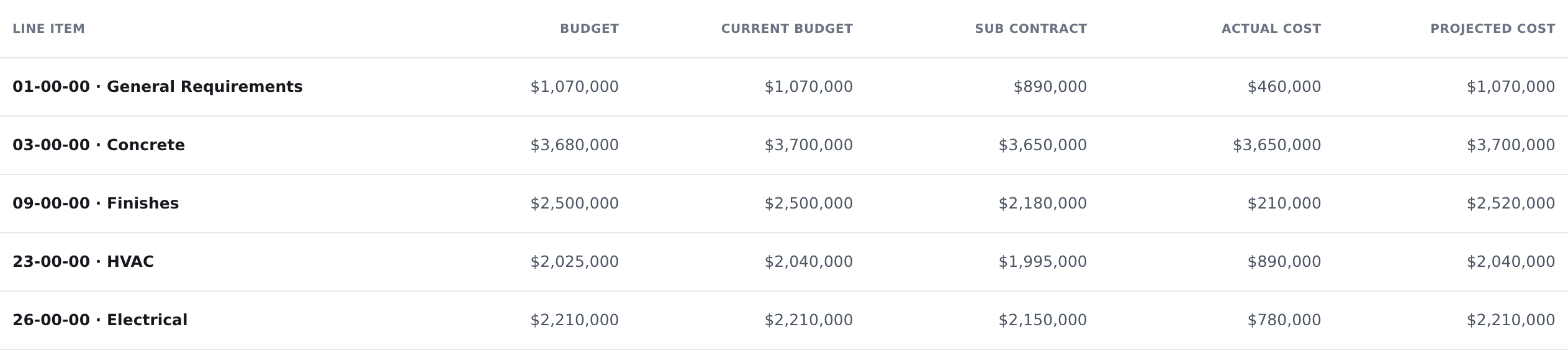
Illustrative cost-code detail from Buildend’s published preview—not a complete project budget or live account capture.
Budget vs. committed
See the approved plan alongside subcontract and purchase-order commitments.
Actual vs. projected
Compare recorded costs with projected final cost by cost code. Check how current your accounting actuals are.
Construction financials with context
Use the related commitment or change record to understand why the budget moved.
FROM FIELD ISSUE TO FINANCIAL RECORD
Follow the change. Not the email trail.
Buildend links change orders to their source records, supports configurable approvals, and carries approved changes into the budget and owner billing.
01 / CAPTURE
Record the change
A field condition or RFI identifies work that needs a decision.
02 / REVIEW
Route the approval
The team prices and reviews the change through the required approval steps.
03 / UPDATE
Reflect the approved value
Approved change orders update the budget so the current plan is visible.
04 / BILL
Carry it into billing
Approved changes become billable line items on the owner’s payment application.
EXAMPLE · NOT A CUSTOMER RESULT
A revised detail adds work to the concrete package.
Connect the source record, approval history, budget impact, and billing item. Ask to see which steps are automatic and where an authorized person must act.
INTEGRATION FIT, NOT JUST LOGOS
Connect your accounting software.
If you use Infor, confirm integration availability with Buildend before planning a connection. For the QuickBooks, Sage, and Yardi integrations below, verify support for your exact product, version, and required records.
QuickBooks
Online and Desktop integrations
Sage
100 Contractor and 300 CRE integrations
Yardi
Review the supported records for your setup
What the QuickBooks Desktop connection supports
Published coverage includes vendors, subcontracts, purchase orders, change orders, commitment invoices, direct costs, cost codes/items, and project/job links.
Web Connector must be running and connected. Object selection and sync cadence are configurable; this is not a promise that every record syncs instantly.
Explore the QuickBooks Desktop integration →Bring these questions to your demo
01 Does our exact product, edition, and version work?
02 Which records move—and in which direction?
03 Who reviews failed syncs and corrections?
04 Which entries or reconciliations remain manual?
05 What connector, setup, and support costs apply?
DAILY WORK, CLEARLY OWNED
Gain better financial control across office and field teams.
Workflows can be configured within project modules. A designated Buildend Administrator owns company-specific setup, access, standards, and adoption.
CAPTURE
Field teams: capture records
Capture the source information, review relevant records, and move work through clear statuses. Keep project context close to the financial decision.
KEEP IT MOVING
Office collaboration
Find linked records, check who owns the next step, and use structured review and approval flows instead of reconstructing the trail.
CONTROL
Operations & accounting
Review project financials and the supported accounting handoffs. Set the permissions, approvals, and reconciliation responsibilities your process needs.
Use configurable module workflows, linked records, and an audit trail to keep work accountable. Confirm the precise permission rules and mobile actions your team requires in the demo.
A PRACTICAL PATH TO ADOPTION
Switch management solutions with a plan for live projects.
Buildend offers onboarding and migration support. A customer-side administrator still leads rollout and manages workflows, permissions, standards, and adoption.
01
Agree on the starting point
Map your accounting setup, data, approvals, and first workflow. Decide which records and projects need to move.
02
Define the migration
Confirm import coverage, attachments, history, reconciliation, timing, and whether existing jobs move or finish in the old system.
03
Assign owners and support
Name your internal administrator. Agree who configures, trains, validates the data, and supports the team after launch.
REAL APP CAPTURE / COST-CODE SETUP
Bring structure to the data before you connect it.
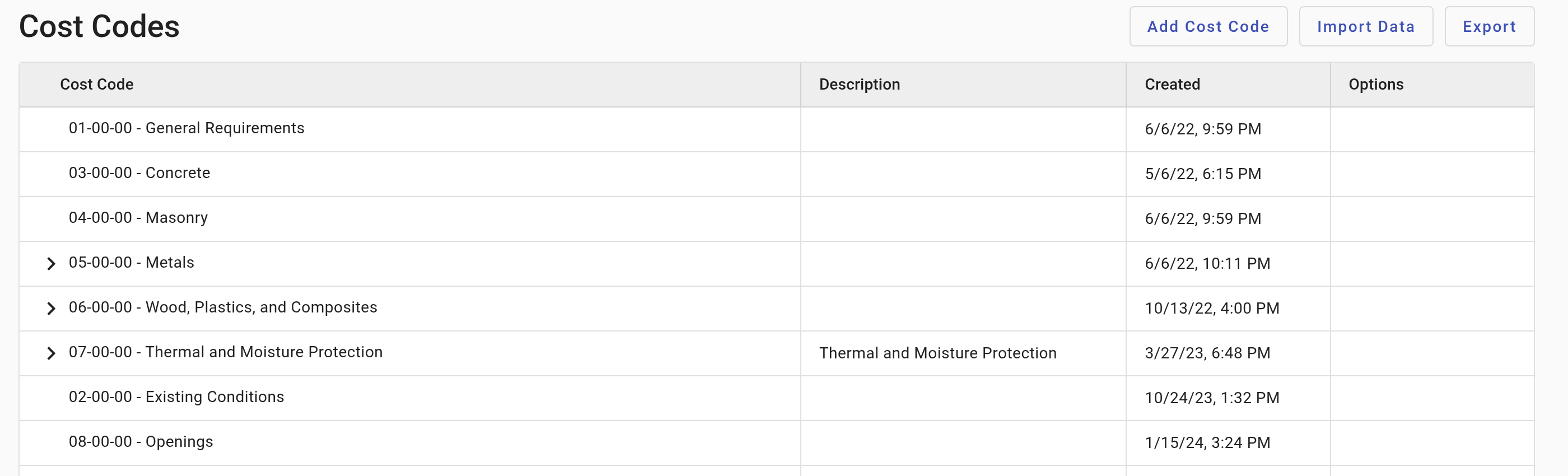
Buildend’s Cost Codes screen provides Add Cost Code, Import Data, and Export controls. Use the setup conversation to agree how your existing codes and project records will map.
Actual app.buildend.com capture, cropped to exclude account details.
Rollout questions to resolve together—not a guaranteed implementation sequence or timeline. Migration scope and implementation costs depend on your requirements.
MAKE A GROUNDED BUYING DECISION
Compare software for contractors—not just prices.
Choose the smallest change that solves the real problem. Compare Buildend with fixing your current workflow—not just with buying another platform.
A stronger fit when…
Your project and accounting tools work separately, but the handoffs do not.
Your team needs consistent commitments, change records, and approvals.
You have an internal owner who can help configure and adopt the system.
Check carefully when…
You need to replace core accounting or require an unverified integration.
A focused fix to your current system could solve the actual bottleneck.
Migration capacity or a critical workflow has not yet been demonstrated.
One platform fee. Verify the full proposal.
Published pricing includes unlimited users, unlimited storage, and all modules. Implementation depends on migration, integrations, imports, and training requirements.
Compare more than the subscription.
Include setup and connector costs, staff time, ongoing administration, and any tools or external work you could genuinely retire. No assumed savings or guaranteed ROI.
A FEW USEFUL DETAILS
Before you bring the team in.
Can our team use Buildend on site?
Buildend supports web access and mobile applications on iOS and Android. Confirm the financial actions, devices, and connectivity requirements your site team needs.
Who helps with permissions or a workflow question?
Your Buildend Administrator handles company-specific access and processes. Buildend Support handles technical issues; the Help Center provides feature guidance.
What happens to historical project records?
Buildend documents preservation of historical references and an audit trail. Ask separately how imported history and exports are handled; preservation does not establish migration or export coverage.
LET’S LOOK AT YOUR WORKFLOW
Bring one workflow. See where Buildend fits.
Bring operations, accounting, and your future power user. Review your accounting setup and follow one budget, commitment, or change through the process.
Useful to have: accounting product/version · current workflow · migration questions