Construction estimate software
Win the job. Don’t rebuild the estimate.
Buildend is construction estimate software for general contractors. Price work with your own costs, compare trade bids, and turn the approved estimate into the project budget without rebuilding it after award.
Takeoff → Estimate → Approval → Project budget
One estimate. A connected starting point.
Approved estimate
$250,000
03 · Concrete
$80,000
05 · Metals
$110,000
09 · Finishes
$60,000
↓ Same cost structure. No re-entry.
Starting project budget
$250,000
Illustrative workflow and sample values. Not a product screenshot.
Construction estimating software, beyond the estimate.
If pricing the job works but setting it up means copying costs into another system, fix the handoff as well as the estimate.
Takeoff measures the work.
Capture counts, lengths, areas, and volumes from drawings.
Estimating prices the work.
Apply quantities, unit costs, subcontractor bids, markup, and contingency.
A connected budget carries it forward.
Start project cost control from the approved estimate. Accounting records the financial transactions.
Build construction estimates from your own cost data.
Construction estimating software combines takeoff quantities with your company’s cost data to build estimates your team can review and explain.
Store cost data in your own library
Keep labor, material, and equipment rates in a shared cost structure. Update company prices as conditions change.
Bidding software: compare trade bids
Review incoming subcontractor bids alongside the estimate. Check exclusions and scope gaps before choosing a price.
Review markup and contingency
Apply markup and contingency by cost code. Make the assumptions behind the total visible for review.
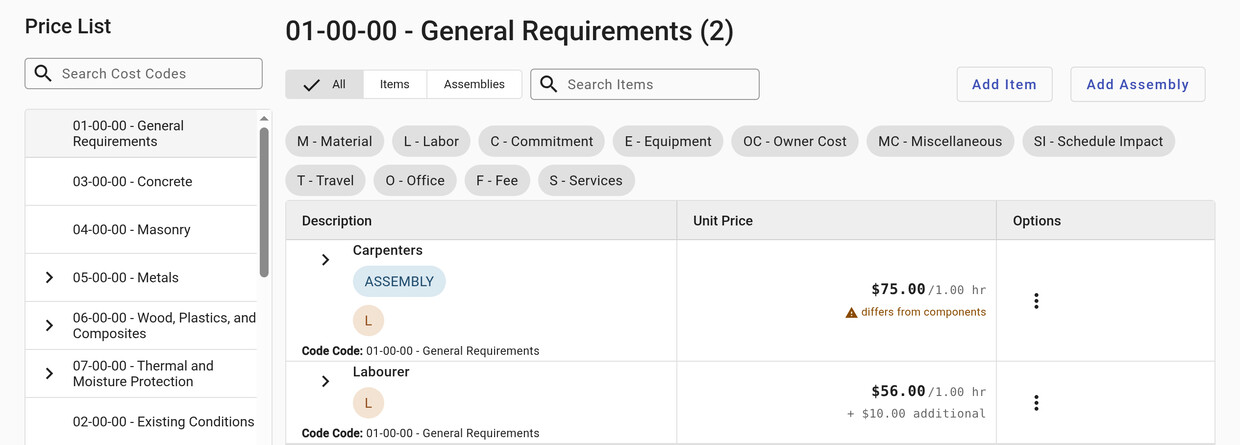
Buildend’s price library, captured from the app. Rates shown are existing account examples, not market benchmarks.
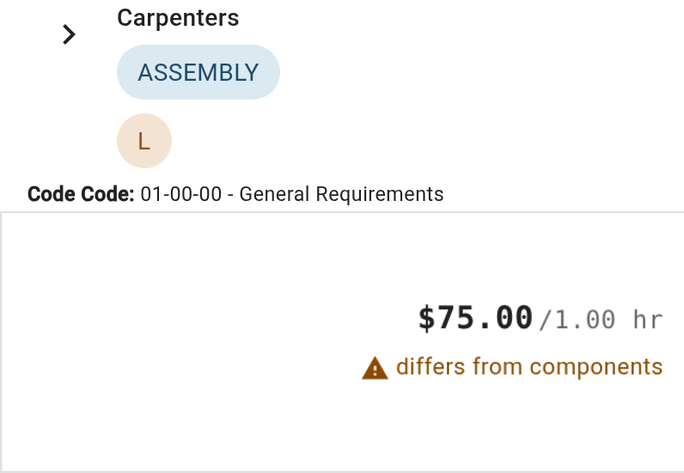
Two cropped details from the real Carpenters price-library row. Existing example data, not market pricing.
The approved estimate becomes the starting budget.
Buildend carries the approved estimate into the project budget with the same cost structure. The team starts from the number it reviewed, not a second version rebuilt after award.
Project event
Amount
What the team needs to know
Estimate approved
$250,000
Starting budget: $250,000, using the approved cost structure.
Concrete subcontract awarded
$76,000
A commitment against the $80,000 concrete allowance, not an automatic rewrite of the estimate.
Budget increase approved
+$12,000
Revised budget: $262,000. Keep the approved change distinguishable from the original baseline.
Illustrative example, not a product screenshot. An award, commitment, and approved budget change are different events; their values need not stay identical.
Remove the re-entry. Keep the review.
Construction estimates are only the starting point. Connect budget movements to commitments, change orders, invoices, and the people responsible for them.
Know what moved the number
Review budget, committed cost, and actual cost by cost code. Follow related financial records for context.
Make the approval path explicit
Configure supported module workflows with review steps, statuses, and clear ownership.
Keep project history meaningful
Buildend preserves historical references and records who changed what and when.
Connect your construction software stack.
Buildend offers accounting integrations for QuickBooks Online, QuickBooks Desktop, Sage 100 Contractor, Sage 300 CRE, and Yardi. Supported records and setup differ by connector. Confirm your exact product, version, and workflow before switching.
Ask what crosses the boundary
Check records, sync direction, cadence, cost-code mapping, and who resolves failed syncs. An integration logo is not the whole workflow.
Example: QuickBooks Desktop
Its documented connector includes commitments, bills, and direct costs. QuickBooks Web Connector must be running; sync cadence is configurable.
Choose estimating software that fits your workflow.
General contractors and remodelers should choose construction estimating software around the work they need to improve, not just a feature list.
Excel and free construction estimating
Exploring free construction estimating options? Compare spreadsheet templates and free tiers against your review and handoff needs. Check current limits, version ownership, and downstream re-entry.
Specialist estimating software
Comparing STACK or another specialist? Test trade-specific assemblies, labor units, and takeoff requirements with your own project. Verify how estimates reach your budget.
A connected platform
Evaluate how Buildend fits your software stack when estimating, budgets, project records, and accounting handoffs need to work together. Test estimating depth and connector fit.
Plan the switch before you move the team.
Agree what moves, what stays accessible, and what changes for each role. Before committing, ask Buildend to confirm migration scope, supported workflows, training, and the accounting setup in your proposal.
01 · Define the records
Decide what must carry over
Bring an estimate, cost codes, and the records you need to retain. Separate live workflow needs from historical reference.
02 · Test the daily work
Include office and field users
Have your coordinator, PM, accounting lead, and a field user review their tasks, visibility, and approval steps.
03 · Agree the rollout
Choose timing deliberately
Ask whether a new-project pilot fits. Confirm access to active and historical jobs before changing existing licenses.
Budget for the whole change: platform fee + migration + integration setup + training + your team’s time. Implementation costs depend on your requirements; confirm them in the proposal.
Pricing and estimating data
Is Buildend pricing per user?
Buildend’s published pricing includes unlimited users, unlimited storage, and all modules in a custom platform fee. Implementation scope and costs are set out in your proposal.
Where do you store unit-cost data?
Store labor, material, and equipment pricing in your company’s unit-cost library. Buildend’s estimating workflow uses those rates; confirm any external cost-data requirements during evaluation.
See what happens to your estimate after you win the job.
Bring a representative estimate and your accounting setup. Ask us to walk through pricing, approval, budget creation, and one project change.