Your pay application goes out on the 25th. Two weeks later it comes back unpaid because the retainage on the summary page doesn't match the continuation sheet. One small electrical contractor described exactly that on Reddit: the GC rejected the pay app "because the retainage calculation didn't match between the G702 and the continuation sheet. Took 3 weeks to get paid." The same owner now spends "a Sunday afternoon redoing these G702/G703s in Excel" every month, "terrified of the formulas drifting from last month."
A rejection lands on top of a payment cycle that is already long. According to Siteline's 2026 State of Subcontractor Billing report, a survey of 492 construction finance and operations professionals by a pay-app software company, pay-app errors and omissions are the leading internal cause of late payment, and 67% of respondents spend 11 or more hours a month on pay apps.
"If you progress bill, you know, on day 20 of the month for the end of the month, and then you get paid 30 days after that … your subcontractor isn't getting paid for 60 to 80 days after the project started."
- Aaron Dearborn, President of Amerail Systems, on Builders, Budgets, and Beers
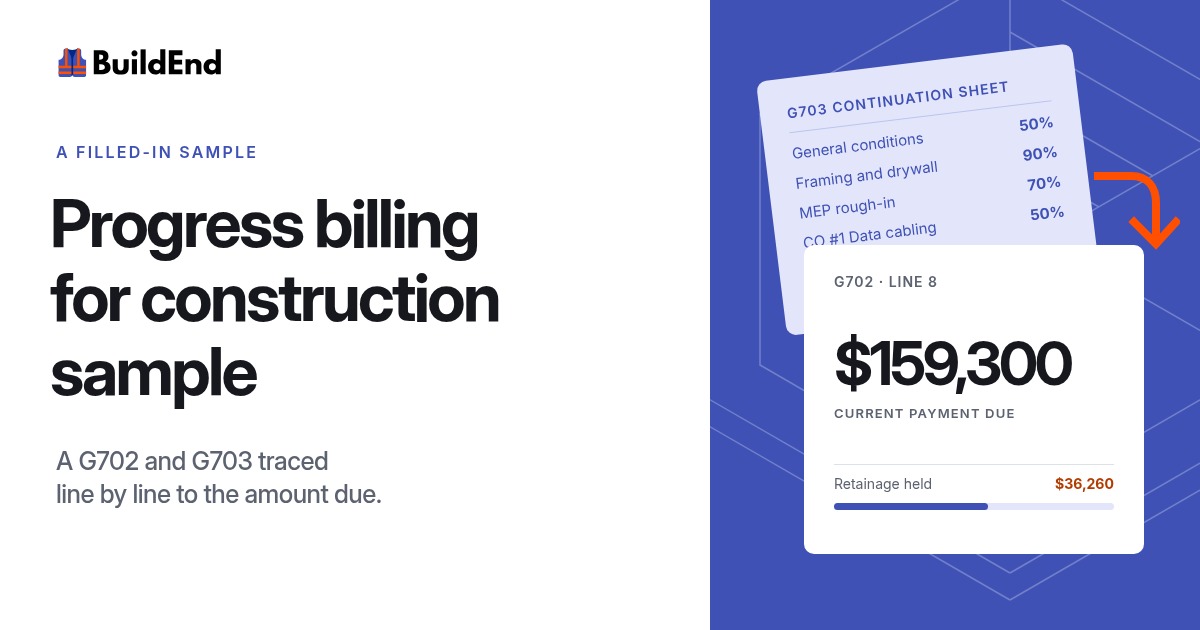
This progress billing for construction sample is one complete pay application: application #3 on an illustrative $658,000 commercial office fit-out, with an approved change order and stored materials. You'll see every G703 column filled in, every G702 line traced to its source, the spreadsheet rules that stop month-to-month drift, and the five checks to run before the bill goes out. All dollar figures in this article are illustrative.
Progress billing for construction sample: the G703 continuation sheet
The G703 continuation sheet lists every schedule of values (SOV) line and shows, for each one, what was billed before, what was completed this period, what is stored and what is left to finish. The G702 summary page only totals those columns, so AIA's payment application guidance recommends completing the continuation sheet first.
The sample job uses these assumptions:
- Original contract: $640,000.
- Change order #1 (data cabling): $18,000, executed before this billing period.
- Retainage: a fixed 10% on completed work and on stored materials.
- Pay applications #1 and #2: certified for $185,600 of completed work, with no stored materials.
Here is pay application #3's continuation sheet:
| A | B: Description of work | C: Scheduled value | D: From previous application | E: This period | F: Materials presently stored | G: Completed and stored to date | G ÷ C | H: Balance to finish |
|---|---|---|---|---|---|---|---|---|
| 1 | General conditions | $64,000 | $19,200 | $12,800 | $0 | $32,000 | 50% | $32,000 |
| 2 | Demolition | $32,000 | $32,000 | $0 | $0 | $32,000 | 100% | $0 |
| 3 | Framing and drywall | $128,000 | $76,800 | $38,400 | $0 | $115,200 | 90% | $12,800 |
| 4 | MEP rough-in | $192,000 | $57,600 | $76,800 | $0 | $134,400 | 70% | $57,600 |
| 5 | Finishes | $160,000 | $0 | $24,000 | $0 | $24,000 | 15% | $136,000 |
| 6 | Millwork | $64,000 | $0 | $0 | $16,000 | $16,000 | 25% | $48,000 |
| 7 | CO #1 Data cabling | $18,000 | $0 | $9,000 | $0 | $9,000 | 50% | $9,000 |
| Total | $658,000 | $185,600 | $161,000 | $16,000 | $362,600 | 55.1% | $295,400 |
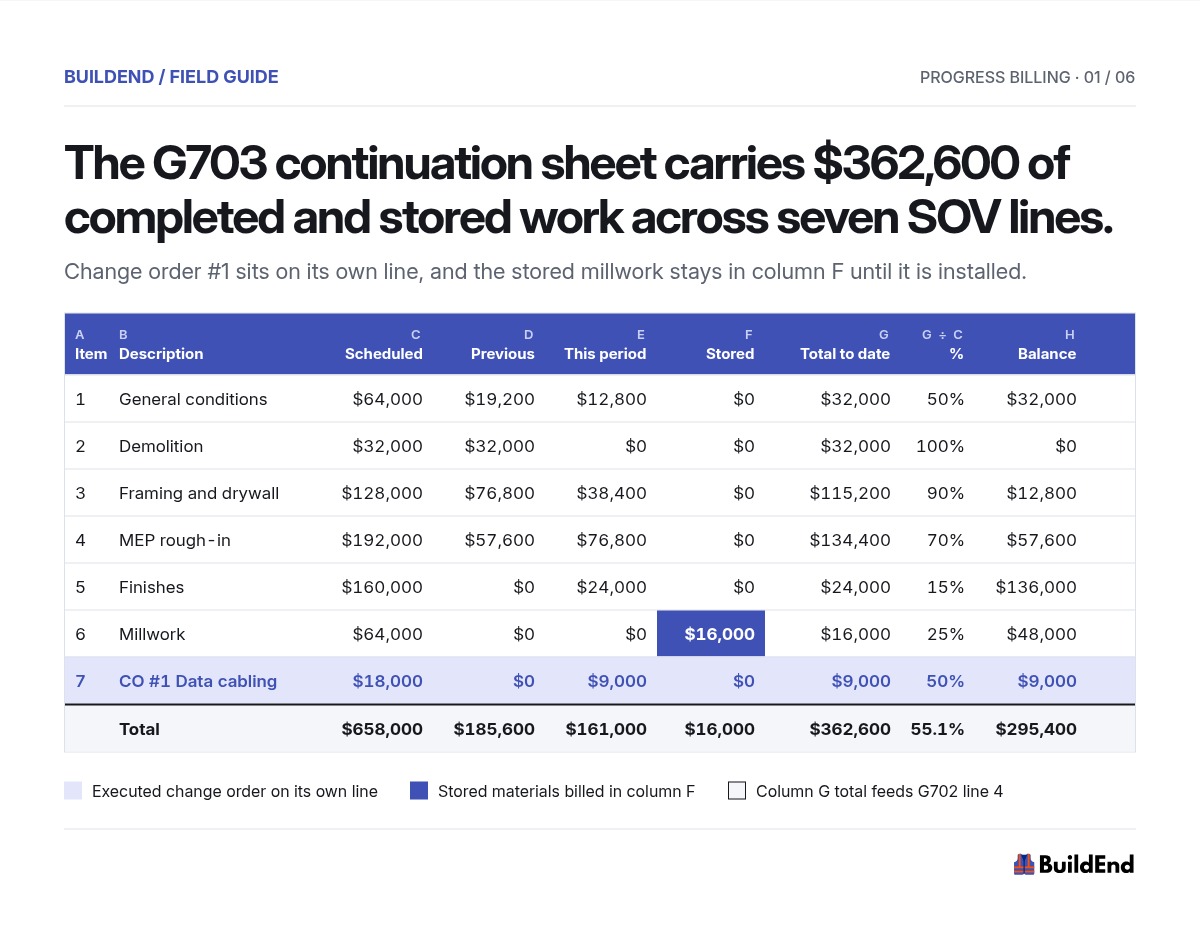
Each column follows a fixed rule from AIA's G703 instructions:
- Column C totals the contract sum to date: $640,000 plus the $18,000 change order.
- Column D equals columns D and E from the previous application. Stored materials from last month never go here.
- Column E is work completed this period, including stored materials that were installed since the last application.
- Column F is materials stored and not yet installed, recalculated every period.
- Column G is D + E + F, and dividing G by C gives the percent complete.
- Column H is C minus G.
Show the change order as its own line
List each executed change order as a separate SOV line instead of spreading its value across existing lines. AIA's instructions note that change orders are "usually" listed separately, "either on their own G703 form or at the end of the basic schedule." Line 7 keeps the $18,000 visible, so the reviewer can match it to the signed change order. Pending changes stay in a separate change order log until they are executed.
"My project administrator … spends hours every month going back and forth with subcontractors saying, hey, you billed for this change order. It hasn't been executed yet. We can't bill against that."
- Michael McKeon, Project Manager at Nordby Construction, on Finance at the Jobsite
Put stored materials in column F
Stored materials go in column F on the line they belong to, not on a separate "stored materials" line. In the sample, $16,000 of millwork is fabricated and stored, and the contract permits billing for it. When the millwork is installed next month, its value moves out of column F and into column E. It is not billed twice, because line 7 of the G702 deducts everything already certified.
Line detail decides how easy each percentage is to defend. McKeon notes that a one-line "50%" is "a lot harder to verify than breaking it out by building, by level, by unit, by scope."
Once the continuation sheet balances, the summary page is arithmetic.
The G702 summary for the progress billing sample, line by line
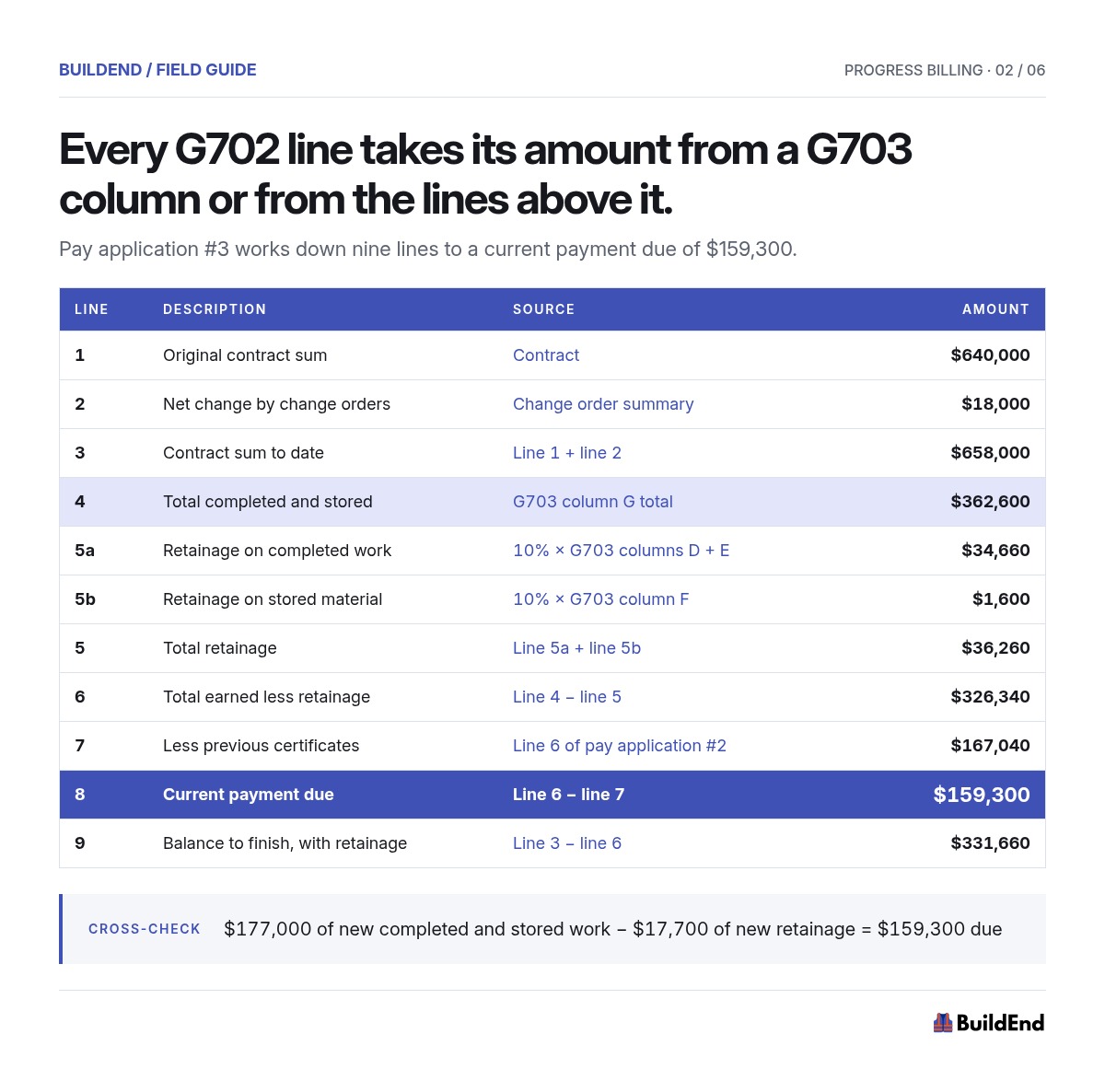
The G702 turns the G703 totals into one figure, the current payment due, which is $159,300 in this sample. Every G702 line comes from a G703 column or from the lines above it, as AIA's instructions set out:
| G702 line | Description | Source | Amount |
|---|---|---|---|
| 1 | Original contract sum | Contract | $640,000 |
| 2 | Net change by change orders | Change order summary | $18,000 |
| 3 | Contract sum to date | Line 1 + line 2 | $658,000 |
| 4 | Total completed and stored to date | G703 column G total | $362,600 |
| 5a | Retainage on completed work | 10% × columns D + E ($346,600) | $34,660 |
| 5b | Retainage on stored material | 10% × column F ($16,000) | $1,600 |
| 5 | Total retainage | 5a + 5b | $36,260 |
| 6 | Total earned less retainage | Line 4 − line 5 | $326,340 |
| 7 | Less previous certificates for payment | Line 6 of application #2 | $167,040 |
| 8 | Current payment due | Line 6 − line 7 | $159,300 |
| 9 | Balance to finish, including retainage | Line 3 − line 6 | $331,660 |
Enter cumulative retainage on line 5
Line 5 is all retainage held to date, not the retainage on this period's work. This period added $177,000 of completed and stored value, so this period's retainage is $17,700. If line 5 shows $17,700 instead of $36,260, line 8 rises to $177,840 and overbills by exactly the $18,560 held on applications #1 and #2. That is the mismatch the electrical contractor above was rejected for.
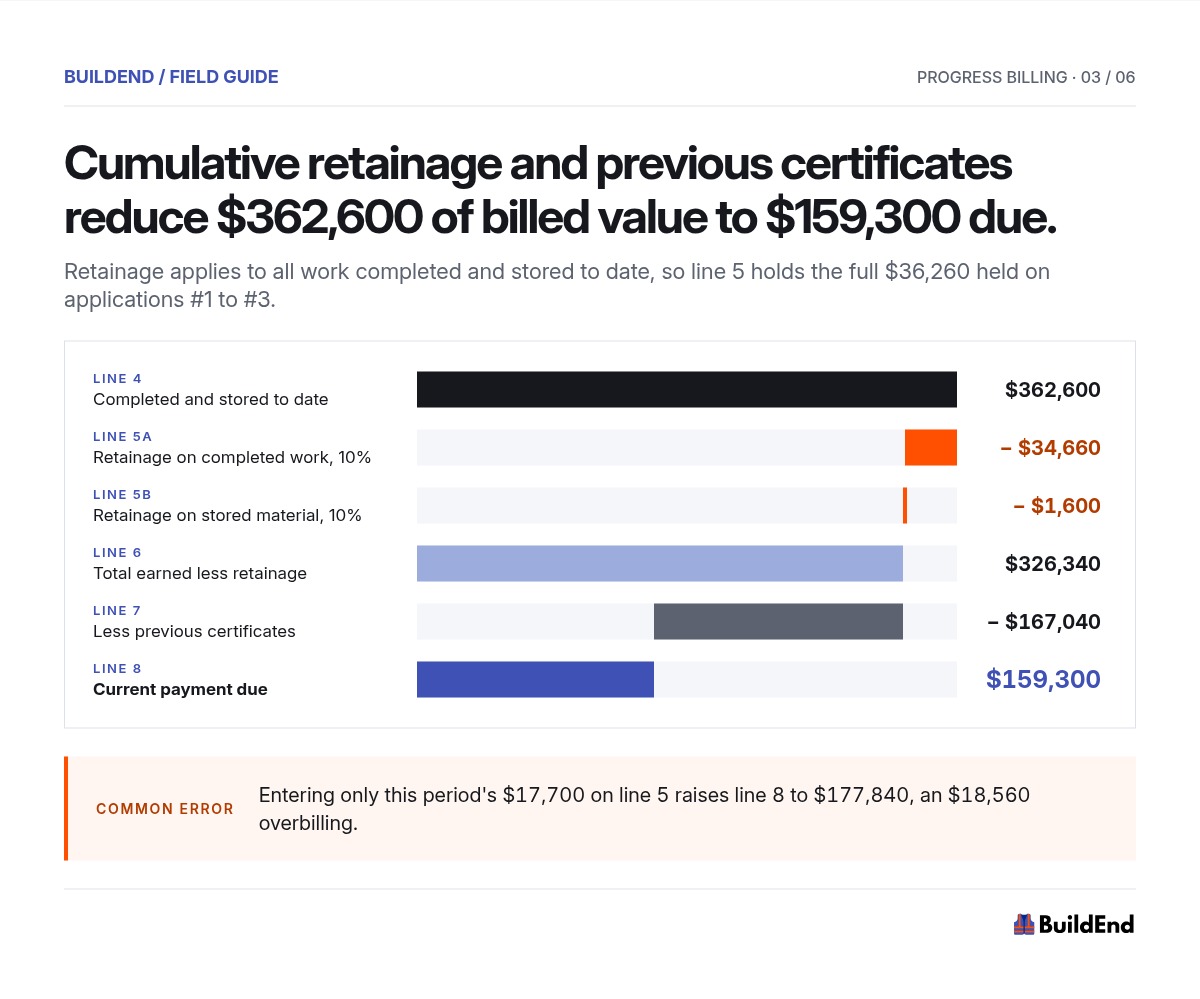
A quick cross-check catches it: the change in line 4 ($177,000) minus the change in retainage ($17,700) equals the current payment due ($159,300). Buildend's construction retainage calculator gives you a second calculation.
Treat certified as different from paid
Line 7 is the amount previously certified, not the amount the owner paid. If the owner short-paid application #2, the shortfall stays in accounts receivable and is not deducted again here.
The math above works once. Keeping it correct every month is a spreadsheet problem.
Turn the sample into a progress billing template that doesn't drift
A progress billing template stays accurate when last month's figures are pulled in by formula, only columns E and F are typed, and the G702 reads every amount from the G703. Drift starts when the sheet is rebuilt by hand.
"It was a four to five day mad scramble to capture all these costs from all over the place and put it in the schedule of values."
- Wade Carpenter, CPA, Carpenter CPAs, describing a $30 million contractor client
Set up the template with five rules:
- Copy the last submitted tab forward. Never edit a tab that has been submitted; it is your record of what was certified.
- Pull column D by formula. In the new tab, D = previous tab's D + previous tab's E for the same row.
- Type only E and F. Columns G, G ÷ C and H are formulas: G = D + E + F, percent = G ÷ C, H = C − G.
- Link the G702 to the G703. Line 4 reads the column G total, line 5a reads 10% of D + E, line 5b reads 10% of F, and line 7 reads line 6 of the previous tab.
- Add two check cells. Flag any row where G is lower than the previous tab's G, and flag the sheet if line 4 doesn't equal the column G total.
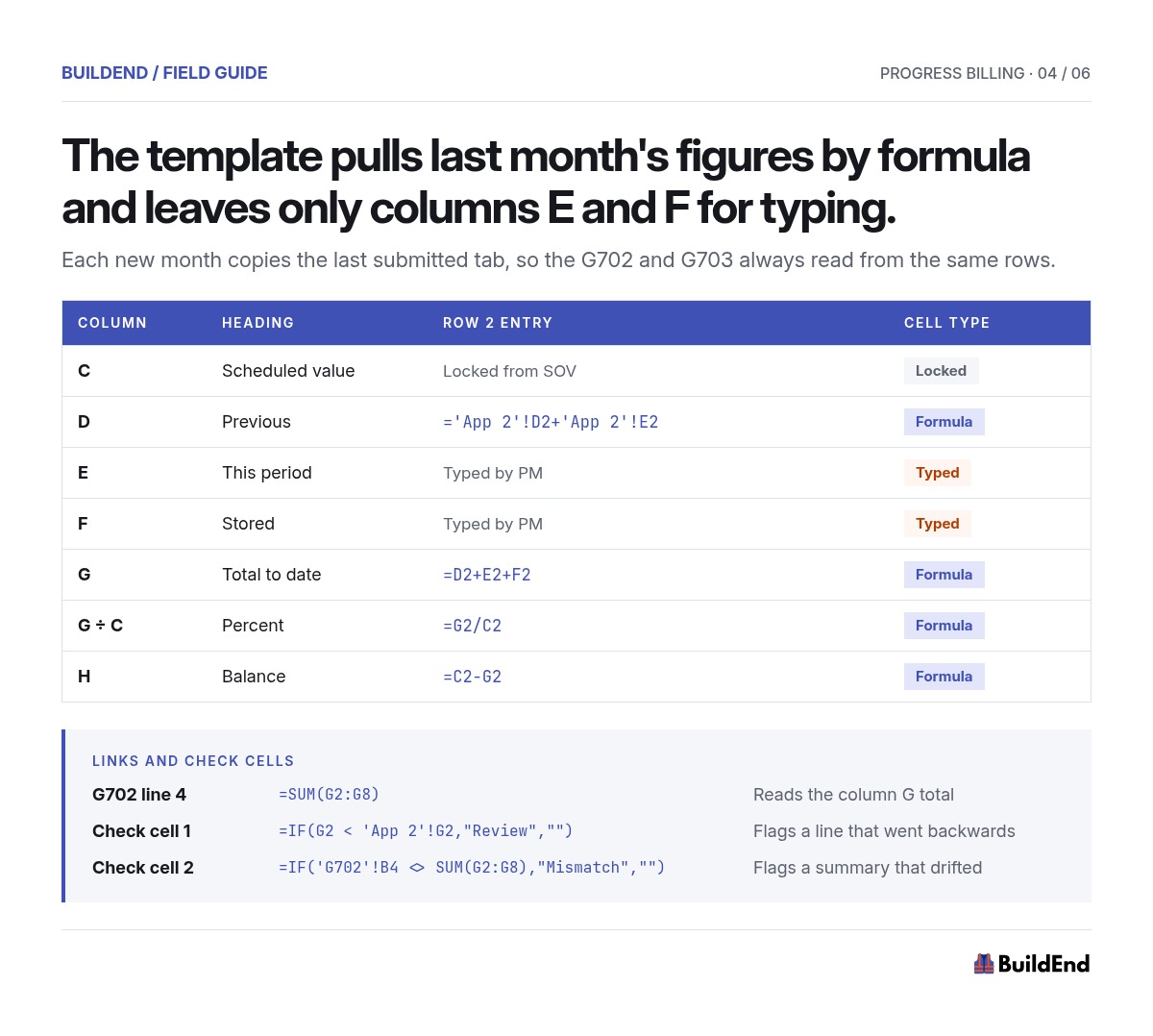
Insert each new change order row above the total row, so the SUM range includes it.
If you prefer to start from a finished form, Buildend's AIA-styled payment application form for general contractors and subcontractor application for payment template follow the same G702/G703 structure.
A clean template stops arithmetic errors. It doesn't stop a reviewer from questioning what you billed.
Check the progress bill before it goes out
Run five checks on every progress bill before you submit it: retainage, cumulative totals, change orders, percent complete and backup. Each one matches a reason practitioners give for pay apps coming back.
- Match retainage on both forms. G702 line 5 equals 10% of G703 columns D + E plus 10% of column F, at your contract's rates.
- Compare cumulative totals with last month. No line's column G drops below the previous application without a written correction. McKeon describes accounting catching subcontractor bills whose total billed to date was lower than the month before.
- Bill executed change orders only. AIA Contract Documents advises: "Ensure all change orders have been approved prior to submitting the pay application."
- Back each percentage with field evidence. Quantities, locations and photos from daily reports answer the question one contractor warned about on Reddit: "The first time you get asked why you think it's XX% complete and you can't provide an explanation your in for a bad time."
- Attach the backup your contract requires. Typical items are lien waivers, invoices and insurance for stored materials, and subcontractor pay applications.
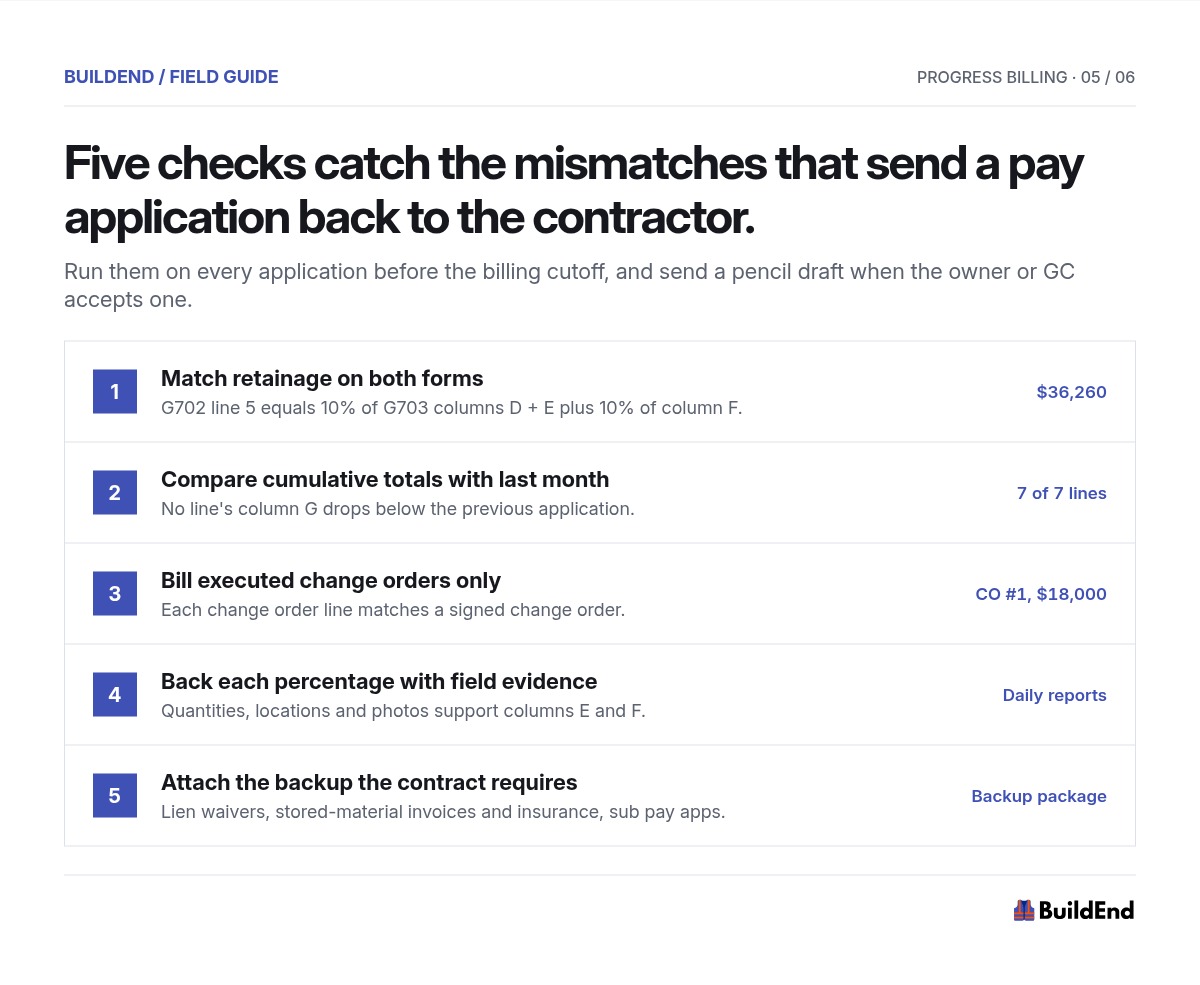
Timing matters as much as accuracy. Send a pencil draft, an informal review copy, a few days before the formal application if your owner or GC accepts one, because the billing cutoff decides which month you get paid in.
"Usually with a general contractor, they have to get their bills out by, say, the 30th of the month to get paid, or they have to wait another 30 days to submit."
- Wade Carpenter, CPA, Carpenter CPAs
Once the bill passes these checks and goes out, two things start: a payment clock and an accounting entry.
What happens after you submit the progress billing sample
After submission, your contract's payment terms set when you get paid, and your accounting system records the certified amount and the retainage as separate receivables.
The payment clock
Federal construction contracts set the clearest timelines. Under FAR 52.232-27, a progress payment is due 14 days after the designated billing office receives a proper payment request, and the prime contractor pays subcontractors within 7 days of receiving payment. Under FAR 32.103, retainage applies when progress is unsatisfactory and does not exceed 10% of the approved estimated amount.
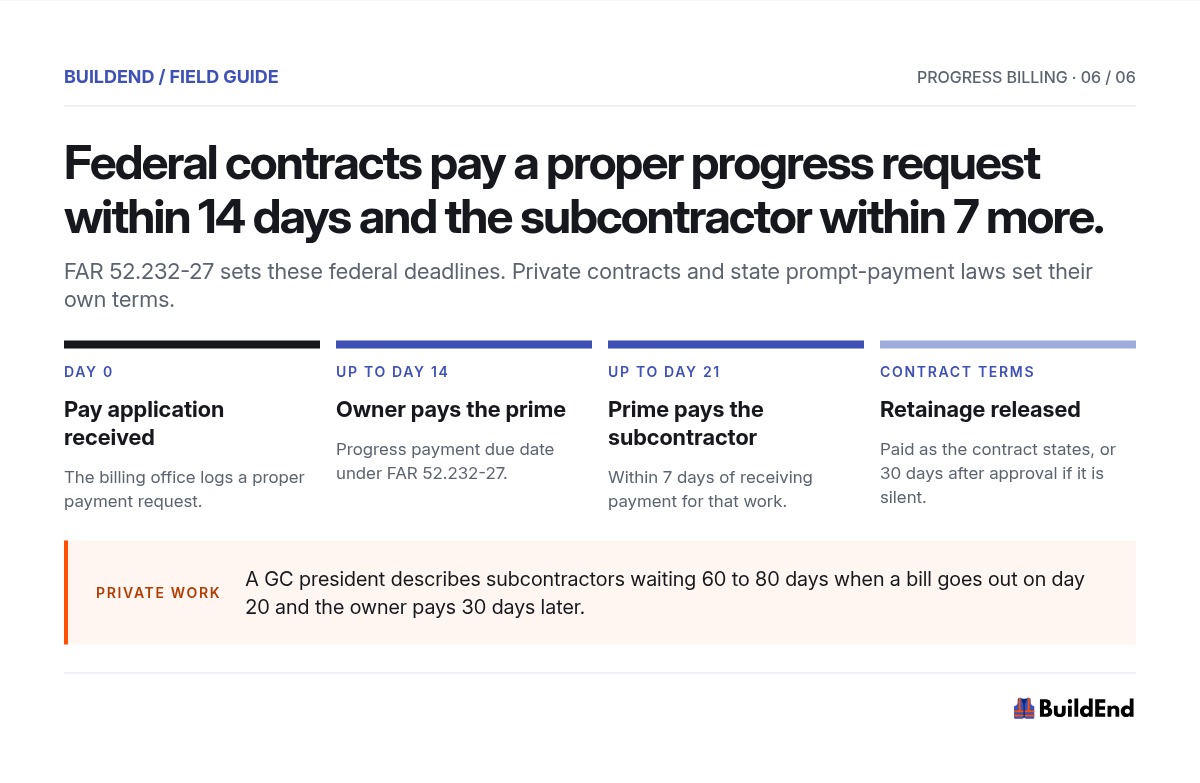
Private contracts and state prompt-payment laws set their own terms, so read your contract and your state's statute. Retainage takes longer still: Drew Turner, EVP and Controller at Cooper Steel, told Billing & Chilling that his team plans for retainage that doesn't come back for 18 months or more.
Where the numbers land in accounting
The certified $159,300 becomes accounts receivable. The $36,260 of retainage is a retainage receivable. Compare the $362,600 billed to date with revenue earned on a cost-to-complete basis to find over or under billing, using the method in how to calculate percentage of work completed in construction.
"What's our over/under billing situation? What do our profit margins look like? Are we getting our change orders, all the things? Are we getting our billings out?"
- Drew Turner, EVP and Controller at Cooper Steel
Those questions are hard to answer when the pay app lives in one spreadsheet and the job cost lives in another system. Buildend's payment application software keeps subcontractor submissions, approvals and the owner draw in one workflow, exports an AIA-style G702/G703, and sends approved invoices to supported accounting integrations such as QuickBooks and Sage instead of re-keying each line.
Use this progress billing for construction sample as your monthly standard
A progress billing sample earns its place when every G702 line traces to a G703 column and the same five checks run before each cutoff. That traceability gets a pay app approved on the first pass.
Start with your most recent pay application. Rebuild it in the layout above, confirm column D equals last month's D + E, recalculate line 5 as cumulative retainage, and run the five checks before your next cutoff. For a two-month walk-through with stored materials moving into installed work, see the construction progress payments example.
If your team is rebuilding the pay app by hand each month, see how Buildend handles it.